
This is an old revision of the document!
Table of Contents
Combining (merging) multiple models into a single .binvox file
This is a fairly popular use case, for which I had promised to write a tutorial many years ago.. 
An example 3D model with multiple components
I constructed the example from a model on Sketchfab (since deleted) and a sphere, combined using the blender 3D modeller (https://www.blender.org):
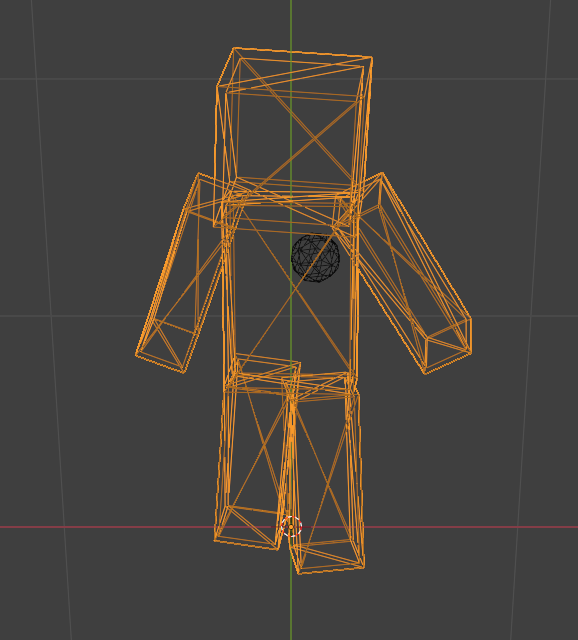
Splitting the 3D model
In blender I selected the “heart” sphere, deleted it, and saved the puppet as an .obj file (File → Export → Wavefront (.obj), then select Z as the up axis). Next, Edit → Undo, and the same step to save the sphere to an .obj file.
The resulting files: puppet.obj and heart.obj
Voxelizing both models in the same coordinate system
The goal is to voxelize them such that after merging they end up in the same spot relative to each other.
For this we need to determine the smallest bounding box that contains both models. Since in our example the “heart” is inside the body, we can use the bounding box of the puppet.
binvox determines a model's bounding box and prints it to the terminal:
# > binvox -d 128 puppet.obj

--- [binvox] mesh voxelizer, version 1.36, build #889 on 2023/07/23 12:28:17, running on Linux

...

  Mesh::normalize, bounding box: [-0.768355, -0.313688, -0.034275, 1] - [0.658711, 0.407517, 2.04301, 1]
...
mesh bounding box as binvox parameter:
  -bb -0.768355 -0.313688 -0.034275 0.658711 0.407517 2.04301

...
Copy and paste the line with '-bb', and pass it to binvox when voxelizing the heart:
# > binvox -d 128 -bb -0.768355 -0.313688 -0.034275 0.658711 0.407517 2.04301 heart.obj
Now both models have been voxelized such that they can be merged, and be the same relative size and in the same relative position.
Merging the resulting binvox files
For this, the binvox_merge tool was created. It takes two binvox files as input, and produces a single binvox file:
binvox_merge heart.binvox puppet.binvox -o puppet_with_heart.binvox
binvox_merge simply sets an output voxel to 1 if it is set in the first input file, and to 2 if it is set in the second input file.
The output file is in the binvox version 2 file format, which supports different values for a set voxel (in the range 1-255).
Visualising the merged binvox file
viewvox (from version 0.51 onwards) supports viewing this new binvox version 2 file format.
A useful new feature is the ability to toggle “point rendering” of each input component, using the number keys 1 through 9 (so in our example only keys 1 and 2 are useful).
Note that typically you want to see all the voxels, so call viewvox with the -ki parameter (keep internal voxels).
Combining more than two binvox models
In version 0.2 (Sept. 2026) the -map parameter was added, which gives you more control over which input values map to which output values.
This is useful when you want to merge more than two binvox models, and keep the output values distinct
(ok the example below does not use the -map parameter, will find a different use case).


Voxelize the largest model to find the reference coordinate system
# -> ../binvox -d 128 puppet.obj

--- [binvox] mesh voxelizer, version 1.39, build #918 on 2025/11/16 17:30:30, running on Linux
--- written by Patrick Min, 2004-2025

parameter string [ -d 128 puppet.obj]
...
  mesh bounding box as binvox parameter:
  -bb -0.061142 0.006028 -0.709564 0.741424 2.11964 0.7046
...
Now voxelize the three “organ objects” with the same bounding box (and same voxel resolution of course):
binvox -d 128 -bb -0.061142 0.006028 -0.709564 0.741424 2.11964 0.7046 stomach.obj
binvox -d 128 -bb -0.061142 0.006028 -0.709564 0.741424 2.11964 0.7046 heart.obj
binvox -d 128 -bb -0.061142 0.006028 -0.709564 0.741424 2.11964 0.7046 brain.obj
One idea could be to merge them in pairs (e.g. puppet_brain.binvox and heart_stomach.binvox), and then merge those.
But the heart_stomach.binvox would overlap with the puppet model, so these voxels would get the single overlap value (-ov) in the final merge.
A solution is to merge them one by one:
binvox_merge puppet.binvox brain.binvox -ov 2 -o puppet_brain.binvox
binvox_merge puppet_brain.binvox heart.binvox -ov 3 -o puppet_brain_heart.binvox
binvox_merge puppet_brain_heart.binvox stomach.binvox -ov 5 -o all.binvox
Then running viewvox -ki all.binvox:


