
getting_started
This is an old revision of the document!
Getting Started
(editing now, 12/7/23)
- open a terminal:
- if you're on Windows: click “Start”, then type “cmd” (+ Enter)
- on a Mac: press Command + Space, type “terminal” (+ Enter)
- on Linux: you'll know how to open a terminal

- change to the directory where you downloaded binvox (typically your
Downloadsfolder) - run
binvoxwithout parameters to see a usage summary - find and download a 3D model you want to voxelize (you could search “download 3d models” in Google)
- make sure it's in a format that binvox supports
- alternatively, use this small test model of a mug
- let's voxelize using the default methods (z-buffer based carving and parity voting), to a voxel grid of 128 x 128 x 128 voxels:
- type in the terminal:
binvox -d 128 mug.ply(+ Enter) - a 128 x 128 window should open showing the mug from 6 directions, first briefly in white, then slice by slice in yellow and orange
- a file
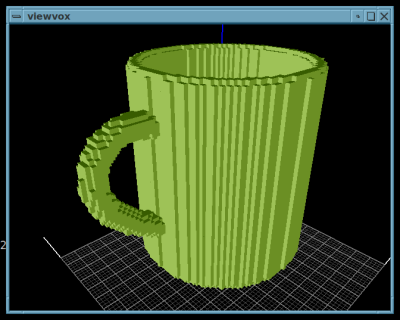
mug.binvoxhas been created (ormug_1.binvox,mug_2.binvox, and so on, if this file already existed in the directory) - you can view it using “viewvox”: if you downloaded viewvox to the same directory, run it with
viewvox mug.binvox
getting_started.1689600267.txt.gz · Last modified: by badmin
Except where otherwise noted, content on this wiki is licensed under the following license: CC Attribution-Noncommercial-Share Alike 4.0 International


